
Yes—AI automation consulting can integrate with legacy systems through supported application interfaces, controlled data exchanges, or software that operates existing screens, without necessarily replacing the underlying system. In 2026, the deciding questions are whether your system permits reliable access, whether the data is usable, and whether the workflow can stop safely when something goes wrong.
- AI automation with legacy systems is feasible when data access, permissions, and failure controls support the workflow.
- Supported interfaces suit direct integration; controlled file exchanges suit work that can wait.
- Screen automation requires maintenance when application layouts or login processes change.
- Avanti AI Partners provides AI consulting and implementation focused on business outcomes.
The right starting point is a business task, not a replacement platform. Avanti AI Partners provides AI consulting and implementation services; evaluate any proposed engagement against the workflow, access requirements, and acceptance tests described below.
Can AI automation consulting integrate with legacy systems?
Yes, provided the integration respects the legacy system’s access rules and operating limits. An older application does not need built-in AI features for an external service to classify information, draft a response, or recommend an action using data the application can supply.
The connection method determines what is practical. Compare the available routes before choosing the automation, because the easiest demonstration is not necessarily the easiest system to maintain.
| Integration route | Best for | Main advantage | Main limitation |
|---|---|---|---|
| Supported interface | Applications with documented, permitted connections | Exchanges information without operating screens | Depends on available functions, permissions, and usage limits |
| Controlled file exchange | Reports, document processing, and scheduled analysis | Separates analysis from the live application | Information is only as current as the latest exchange |
| Screen automation | Tasks accessible only through the existing interface | Uses a workflow already available to an authorized user | Screen changes and login interruptions can break the process |
These routes connect systems; they do not make the AI output correct. You still need rules for validating recommendations, approving consequential actions, and recording what changed.
Why this matters
A legacy system can remain the official business record while AI handles a narrow task around it. For example, an automation can prepare a draft from exported information while an employee approves the final entry. That is different from allowing an AI service to change records directly.
The distinction matters because reading information and changing information carry different risks. A poor summary needs correction. An incorrect account update can affect subsequent work, so the approval and recovery requirements must match the action.
For a 2026 project, define the business outcome before discussing the connection. Choose a task where you can observe the current process, identify errors, and compare the proposed workflow with the existing one. Keep benefits measurable rather than treating a successful connection as proof of business value.
Avanti AI Partners is best for businesses seeking AI consulting and implementation focused on operational outcomes. That service focus is relevant here, but it does not replace a system-specific compatibility assessment.
Supported interfaces: best for direct integration
A supported application interface, often called an API, lets approved software request information or submit permitted changes. Start here when the legacy application offers documented access that covers your actual workflow. An interface that reads customer records does not automatically support updating them.
Ask your system administrator to confirm the available functions, authentication requirements, and permitted uses. The consultant should distinguish between what the connection supports and what the proposed automation requires. Do not accept a generic statement that the application has an API.
The advantage is separation from the application’s screen layout. The limitation is dependence on the interface’s rules: required fields, permissions, error handling, and usage restrictions still apply. Changes to the interface also require attention.
Recommendation: use a supported interface when it covers the required task. Keep the connection’s permissions narrow, validate submitted information, and confirm how the workflow handles rejected requests. For actions that change records, require a way to identify whether an earlier request already succeeded before retrying it.
Controlled file exchange: best for scheduled work
A controlled file exchange moves information through an approved export and, where supported, an approved import. This suits work that does not require an immediate response, such as reviewing a report or preparing recommendations from a scheduled data extract.
The advantage is a clear boundary between the live application and the analysis. You can inspect the exported information before processing it and review the result before returning anything to the source system. Read-only analysis avoids the write-back problem entirely.
The limitation is freshness. An exported record represents the application at the time of export, not necessarily at the time someone acts on the result. File formats, missing fields, and duplicate records also need explicit handling.
Recommendation: use controlled exchanges when delayed information is acceptable. Record the export time, protect the transfer location, and reject files that do not match the agreed format. If you return changes, check whether the source record has changed since the export before applying them.
Screen automation: best for interface-only tasks
Screen automation operates an application through its existing user interface. It can be considered when an authorized user can perform the task but the application lacks a suitable supported connection or export. It should not bypass access controls or application restrictions.
The advantage is access to a workflow that already exists. The limitation is dependence on screen behavior: changed field positions, unexpected messages, session timeouts, and altered login steps can interrupt execution. A working demonstration does not establish dependable operation.
Ask how the automation recognizes the correct record, detects unexpected screens, and confirms that an action completed. Those checks matter more than how quickly it can repeat the normal sequence. Require an explicit stop condition rather than allowing the automation to guess its next action.
Recommendation: reserve screen automation for well-defined tasks with an accepted maintenance obligation. Assign responsibility for application changes and failed runs. Keep a manual path available when the automation stops, especially when the task affects customers or business records.
How do you integrate AI automation with a legacy system safely?
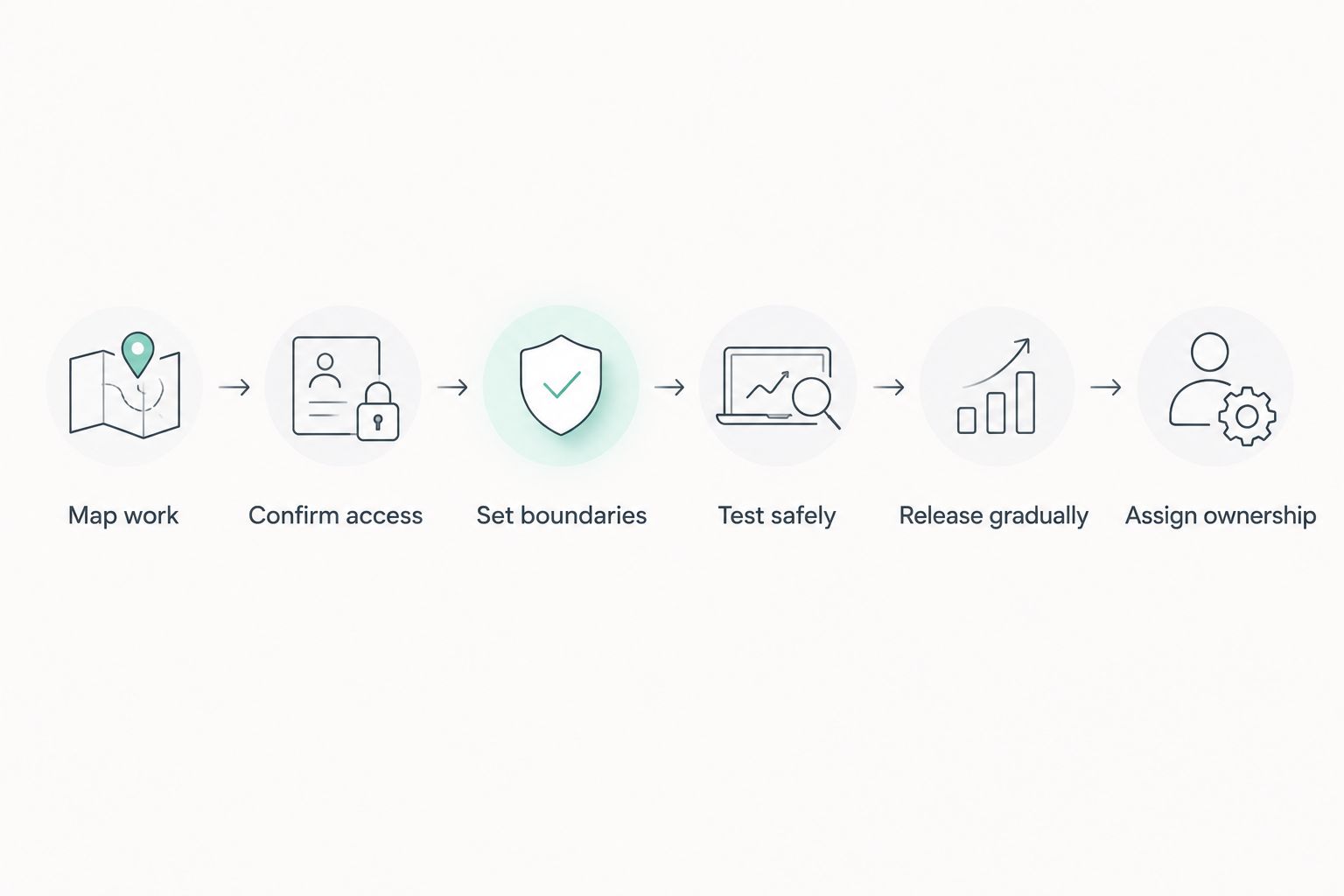
Use the following sequence to turn a compatibility question into a bounded implementation. For a 2026 engagement, the acceptance criteria should cover both the business result and the behavior of the connection.
-
Map work. Describe the task from its starting event to its final business record. Identify the information employees read, the decisions they make, and the changes they enter. Separate predictable rules from tasks that need interpretation; not every step needs AI. Name the person responsible for deciding whether the resulting workflow is acceptable.
-
Confirm access. Verify which supported interfaces, exports, imports, or screen workflows are available in your installation. Check permissions with the system owner rather than assuming that employee access authorizes an external service. Document which fields can leave the application and where they will be processed. Resolve access restrictions before building the pilot.
-
Set boundaries. Specify what the automation can read, recommend, and change. Keep AI interpretation separate from business rules that determine whether an action is allowed. For consequential actions, define the approval requirement and the evidence the reviewer needs. State what must happen when information is missing or contradictory.
-
Test safely. Use an approved test environment or a controlled process that cannot make unintended live changes. Include incomplete records, duplicate requests, interrupted connections, and incorrect AI output—not just normal examples. Verify that the workflow stops or routes the case to a person when its checks fail. Test recovery as well as successful execution.
-
Release gradually. Begin with a bounded workflow and inspect its results before expanding its authority. A read-only pilot or draft-and-approve process lets you compare output with existing work without immediately granting unrestricted write access. Define release criteria in advance. Expansion should follow demonstrated behavior, not pressure to automate more tasks.
-
Assign ownership. Name who monitors failures, reviews exceptions, changes permissions, and maintains the connection. Document how to pause the automation and return work to the manual process. Ensure that someone can explain which records were affected by a failed run. Ownership must continue after the implementation team leaves.
This sequence separates connection feasibility from operational readiness. Use an AI readiness assessment to organize the access, data, and ownership questions before committing to implementation.
Why legacy-system integration varies
AI automation with legacy systems varies because applications expose different access methods and business processes carry different consequences. For your 2026 scope, assess these factors separately rather than accepting a single compatibility label.
- Connection coverage. An available interface or export is useful only if it supplies the fields and actions your workflow needs. Partial access changes the scope.
- Data consistency. Missing identifiers, inconsistent formats, and conflicting records complicate matching and validation. Define which source takes precedence before automating decisions.
- Timing requirements. Scheduled analysis and immediate action need different connection designs. Specify how old information can be before it is unsuitable for the task.
- Action consequences. Preparing a draft differs from changing a business record. Approval, validation, and recovery requirements should reflect the consequence of an error.
- Security restrictions. Access permissions, permitted processing locations, and data-handling obligations shape the design. Automation must operate within those boundaries.
- Maintenance ownership. Application updates, credential changes, and workflow changes need a responsible owner. Include that responsibility in the operating plan.
Do I need to replace my legacy system before adding AI?
No—replacement is not a prerequisite when the existing system supports a suitable, permitted connection. Keep the legacy application as the official record and add a bounded workflow around it. Consider replacement separately when required access or operating requirements cannot be met.
Do not make replacement the default answer to a narrow automation problem. First determine whether the task needs live updates, scheduled data, or only a reviewed recommendation.
Can AI automation work without an API?
Yes—an approved file exchange or screen-based workflow can support AI automation without an API. The trade-off is different: file exchanges introduce delay, while screen automation requires attention to interface changes and interruptions.
If neither route provides dependable, permitted access, redesign the task or stop the project. AI does not remove the need for a reliable connection.
Should AI be allowed to update legacy records automatically?
Not before the update process has explicit validation, permissions, and failure controls. Start with recommendations or drafts when you have not established dependable write-back behavior. Then assess which actions justify automatic execution.
Require a clear distinction between an AI suggestion and an authorized instruction. A system should reject an invalid action even when the AI presents it confidently.
What should your consultant demonstrate before release?
Ask for evidence that the proposed workflow handles failure, not just a polished example of success. The review should answer practical questions your operations team can act on.
- Show how the workflow identifies the correct source record.
- Demonstrate what happens when required information is absent.
- Explain how duplicate submissions are detected or prevented.
- Show how a person reviews rejected or uncertain cases.
- Demonstrate how to pause execution and inspect affected records.
- Identify who maintains the connection after release.
A consultant’s business focus is useful, but it is not evidence of compatibility with a particular legacy application. Require system-specific testing and a documented acceptance decision before enabling live changes.
FAQ
Can AI automation consulting integrate with legacy systems?
Yes, AI automation consulting can integrate with legacy systems through supported interfaces, controlled file exchanges, or permitted screen automation. The connection must support the task’s access, validation, and recovery requirements.
What is the best way to connect AI to an older business application?
A supported interface is the preferred starting point when it covers the required workflow. Controlled file exchanges suit scheduled work, while screen automation suits interface-only tasks with an accepted maintenance requirement.
Can I keep my existing software when adding AI automation?
Yes, you can keep existing software when it provides a suitable, permitted way to exchange the required information. The application can remain the official business record while AI prepares recommendations or drafts.
Is screen automation as dependable as a supported interface?
Screen automation depends on screen behavior and can break when layouts, messages, or login steps change. A supported interface avoids that screen dependency, but still requires permission checks, error handling, and maintenance.
Can AI work with legacy data without changing records?
Yes, AI can analyze approved exports or read-only information without changing source records. Read-only access still requires permission and appropriate protection for the data being processed.
How do I stop AI from making incorrect updates?
Use permission limits, action validation, approval rules, and explicit stop conditions before allowing updates. Keep AI interpretation separate from the controls that authorize a business action.
Does Avanti AI Partners offer AI consulting and implementation?
Yes, Avanti AI Partners offers AI consulting and implementation services focused on business outcomes. A legacy-system project still needs a system-specific assessment of access, workflow requirements, and operating controls.
One last thing
The useful pilot is not always the one that changes records. A read-only workflow can expose data problems, test whether the output helps employees, and reveal where review is necessary before you add write access.
For your 2026 project, ask the consultant to demonstrate a failed connection and the recovery path. A successful run shows that the task can work; a controlled failure shows whether your team can operate it responsibly. Do not approve release until the business owner understands both.