
Manual CSAT review means an agent skims a ticket after it closes, a survey lands in an inbox nobody opens, and the score you report on Monday is already three days stale. Connect Zendesk to an AI scoring layer instead, and every solved ticket gets a satisfaction score the moment it closes — no survey response required, no backlog, no guessing which conversations went sideways.
- A Zendesk AI customer satisfaction scoring workflow scores every solved ticket automatically instead of waiting on survey responses.
- Zendesk Support Suite or Enterprise plans expose the webhook and API access this workflow needs in 2026 — Team plans do not.
- Score tickets at solve time and again mid-conversation to catch at-risk conversations before they close.
- Route any score below your threshold straight to a team lead, not a dashboard nobody checks.
- Setup runs on triggers, webhooks, and one custom ticket field — no new software purchase required.
Why this matters
Survey-based CSAT has a structural problem: most customers who get a satisfaction survey never respond, so the score you're reporting reflects a small, self-selected slice of your ticket volume. An AI scoring workflow reads the actual conversation — every message, not just the final one — and produces a score for 100% of solved tickets, not the fraction that bothered to click a star rating.
This matters more in 2026 than it did two years ago because ticket volume per agent keeps climbing while headcount budgets stay flat. Teams evaluated by customer service operations benchmarks need a satisfaction signal that updates in real time, not one that lags a week behind the conversation. Avanti AI Partners builds this exact workflow for support teams that want the score without hiring anyone new to generate it.
The quotable verdict: a Zendesk AI customer satisfaction scoring workflow beats a survey-only setup for any team solving more than a few hundred tickets a month, because it scores every conversation instead of the handful that respond.
Before you start
- Zendesk plan: you need Support Suite or Enterprise. Triggers and basic webhooks exist on lower tiers, but the API access and custom field volume this workflow uses require the higher plans.
- An AI scoring endpoint: a sentiment/CSAT API (OpenAI, Anthropic, or a purpose-built scoring tool) with an API key you can call from a webhook. You are not buying new software — you are wiring existing tools together.
- The gotcha: Zendesk webhooks send a payload on the event, but they do not retry indefinitely on failure, and they do not include the full ticket conversation by default. If your webhook only passes the ticket ID, your AI endpoint has to make a second call back to Zendesk's API to pull the transcript — build that second call into your setup now, or your scores will come back based on subject lines alone.
Set up your Zendesk trigger
- In Admin Center, go to Objects and rules > Business rules > Triggers.
- Click Add trigger and name it something like "AI CSAT Scoring – Ticket Solved."
- Under Conditions, set Ticket: Status changed to Solved.
- Under Actions, select Notify by and choose active webhook (you'll create this in the next step if it doesn't exist yet).
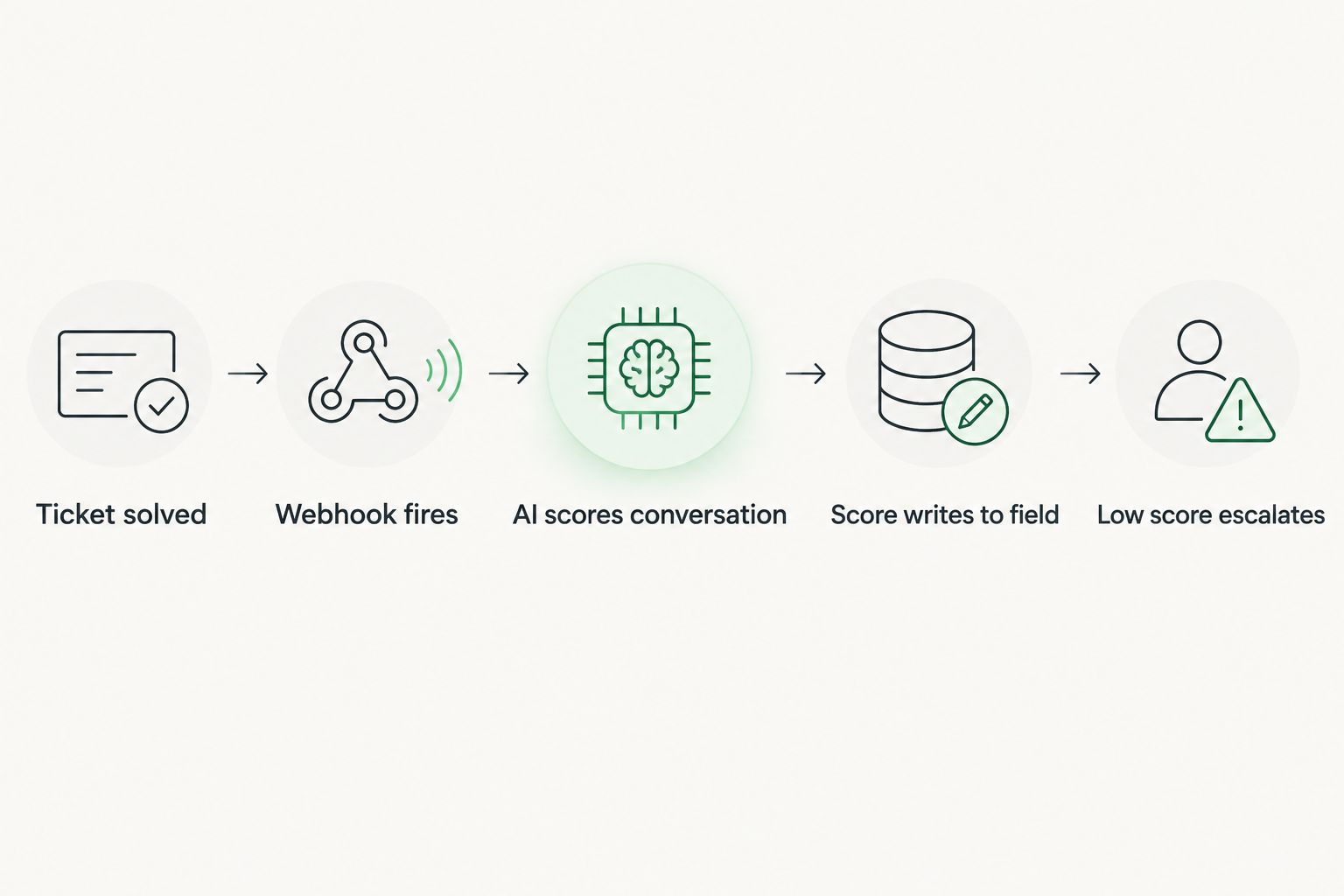
Expected result: every ticket that moves to Solved fires this trigger exactly once, visible in the trigger's usage log within a few minutes of your first test ticket.
Configure the AI scoring endpoint
- Go to Admin Center > Apps and integrations > Webhooks and click Create webhook.
- Set the Endpoint URL to the address of your scoring service (the middleware that calls your AI API and writes back to Zendesk).
- Choose JSON as the request format and add an Authentication header with your API key.
- In the request body, include
ticket_id,conversation, andtagsso the scoring service has full conversation text, not just metadata. - Save, then link this webhook back to the trigger you built in the previous step.
Expected result: submitting a test ticket to Solved triggers an outbound POST request visible in your webhook's delivery log, with a 200 response from your endpoint.
Map the score back into Zendesk
- Create a custom ticket field: Admin Center > Objects and rules > Ticket fields, add a Number field named AI CSAT Score (a 1-100 or 1-10 scale, your choice).
- In your scoring service, after the AI call returns a value, make a PUT request to the Zendesk Tickets API to write that value into the new custom field.
- Add a tag like
ai_scoredon the same request so you can filter scored versus unscored tickets in views and reports. - Build a Zendesk view filtered by AI CSAT Score below your risk threshold, sorted by most recent.
Expected result: within seconds of a ticket closing, the AI CSAT Score field populates and the ticket appears in your risk view if the score is low.
Build the escalation path
- Create a second trigger: Conditions set to AI CSAT Score less than your threshold (say, 40 on a 100-point scale) and tag contains
ai_scored. - Under Actions, choose Notify by and route to a Slack webhook, or reassign the ticket to a Team Lead group for follow-up.
- Add a second action to remove the
ai_scoredtag and addneeds_followupso it doesn't re-trigger on future edits.
Expected result: any ticket the AI flags as at-risk lands in front of a human within minutes of the score writing back, not at the end of a weekly report.
Trigger timing: solved vs. mid-conversation
| Trigger Point | What It Catches | Best For |
|---|---|---|
| Ticket solved | Full conversation, complete sentiment arc | Teams tracking accurate historical CSAT trending — use this |
| Ticket updated (mid-conversation) | Escalation risk before the ticket closes | Teams that want to intervene before a bad outcome ships — use this |
Most teams in 2026 run both: solved-ticket scoring for trend reporting, mid-conversation scoring for live intervention.
Score tickets mid-conversation, not just at close
Running the trigger only on Solved means you find out a ticket went badly after it's already over. The variant: fire the same webhook on Ticket: Updated whenever a new public comment is added, and score the conversation as it stands.
- Duplicate your Solved trigger and change the condition to Ticket: Comment is public and Comment: Created.
- Cap this to tickets already past two or three replies, so you're not scoring a one-line opener with nothing to analyze.
- Set the escalation threshold slightly higher than your solved-ticket threshold, since mid-conversation sentiment is noisier.
This is the workflow Avanti AI Partners recommends pairing with an existing spike-response setup — if you already route support tickets to AI when volume spikes, mid-conversation scoring tells you which of those AI-handled tickets need a human before they close, not after.
“A satisfaction score that arrives after the survey window closes is a postmortem, not a save.”
Troubleshooting
- Webhook returns 401 or 403: your API key expired or the auth header format doesn't match what your scoring endpoint expects. Regenerate the key and confirm the header name matches exactly.
- AI CSAT Score field never updates: the custom field ID in your PUT request doesn't match the field's actual ID in Zendesk — field IDs are numeric, not the display name, and mismatches fail silently.
- Scores cluster near the same number for every ticket: your payload is truncating the conversation before it reaches your AI endpoint, so the model is scoring a fragment instead of the full thread.
- Reopened tickets get scored twice with conflicting values: the Solved trigger fires again on reopen-then-resolve. Add a condition excluding tickets already tagged
ai_scoredunless the ticket was reopened, in which case allow a rescore and overwrite the field. - High ticket volume causes rate-limit errors from your AI provider: queue the webhook calls instead of firing them all synchronously, and batch-process during off-peak windows if your provider enforces per-minute caps.
Customize your workflow
Once scoring is live, the score itself becomes a lever for other automations: route low-scoring tickets to your best agents, exclude scored-and-flagged customers from upsell campaigns, or feed the score into a weekly digest for account managers. Teams running lead scoring on the sales side already have a template for this — the same trigger-plus-API pattern powers a Salesforce AI lead scoring workflow, just pointed at a different object.
If you're weighing whether to build this in-house or bring in outside help, the setup itself takes a few days of engineering time, but tuning the scoring thresholds against your actual ticket mix takes longer — that's usually the part that gets outsourced.
Get the workflow built for you
Avanti AI Partners sets up Zendesk AI scoring end to end.
FAQ
What's the best way to score Zendesk tickets for customer satisfaction with AI in 2026?
The most reliable setup fires a webhook on Ticket Solved, sends the full conversation to an AI scoring endpoint, and writes the result into a custom Zendesk field. Adding a second trigger on mid-conversation updates catches at-risk tickets before they close.
Is AI CSAT scoring better than traditional post-ticket surveys?
AI scoring covers 100% of solved tickets because it reads the conversation instead of waiting for a survey click. Surveys still capture a customer's own words directly, so many teams run both rather than replacing one with the other.
Do I need Zendesk Enterprise for this workflow?
You need Support Suite or Enterprise. Both plans expose the webhook creation and API field access this workflow depends on; lower Zendesk tiers restrict these features.
Does AI scoring replace CSAT surveys entirely?
No — AI scoring measures sentiment from the conversation itself, while a survey captures a customer's direct, self-reported rating. Running both gives you a real-time signal plus a validated customer-voiced score.
How accurate is AI sentiment scoring compared to a human reviewing the ticket?
Accuracy depends on how much conversation context reaches the AI endpoint — a truncated payload scores worse than a human skim, while a full-thread payload generally matches human judgment on clearly positive or negative tickets.
What causes AI CSAT scores to look wrong or clustered?
The most common cause is a webhook payload that only sends the ticket ID or subject line instead of the full conversation text, which starves the AI model of the context it needs to score accurately.
How long does it take to set up this workflow?
The trigger, webhook, and custom field setup typically takes a few days of engineering time in 2026; tuning the escalation threshold against real ticket volume takes longer and is worth testing for two to three weeks before trusting it fully.
Can this workflow route low scores to a specific team automatically?
Yes — a second Zendesk trigger conditioned on the AI CSAT Score field can reassign the ticket to a team lead group or send a Slack notification the moment the score writes back.
One last thing
The part teams miss most often: scoring the full conversation thread, not just the customer's last message, is what separates a workflow that actually predicts churn risk from one that just restates whatever mood the customer was in when they typed "thanks." A ticket that opens angry and ends polite still has an escalation in the middle worth flagging — and that only shows up if your AI endpoint reads the whole thread, not the closing line.