
NetSuite gives you accurate historical demand data. It does not tell you what's coming next. Instead of planners re-running the same reorder-point math every Monday, connect NetSuite's transaction data to an AI forecasting layer that flags demand shifts before they show up as a stockout or a warehouse full of dead stock.
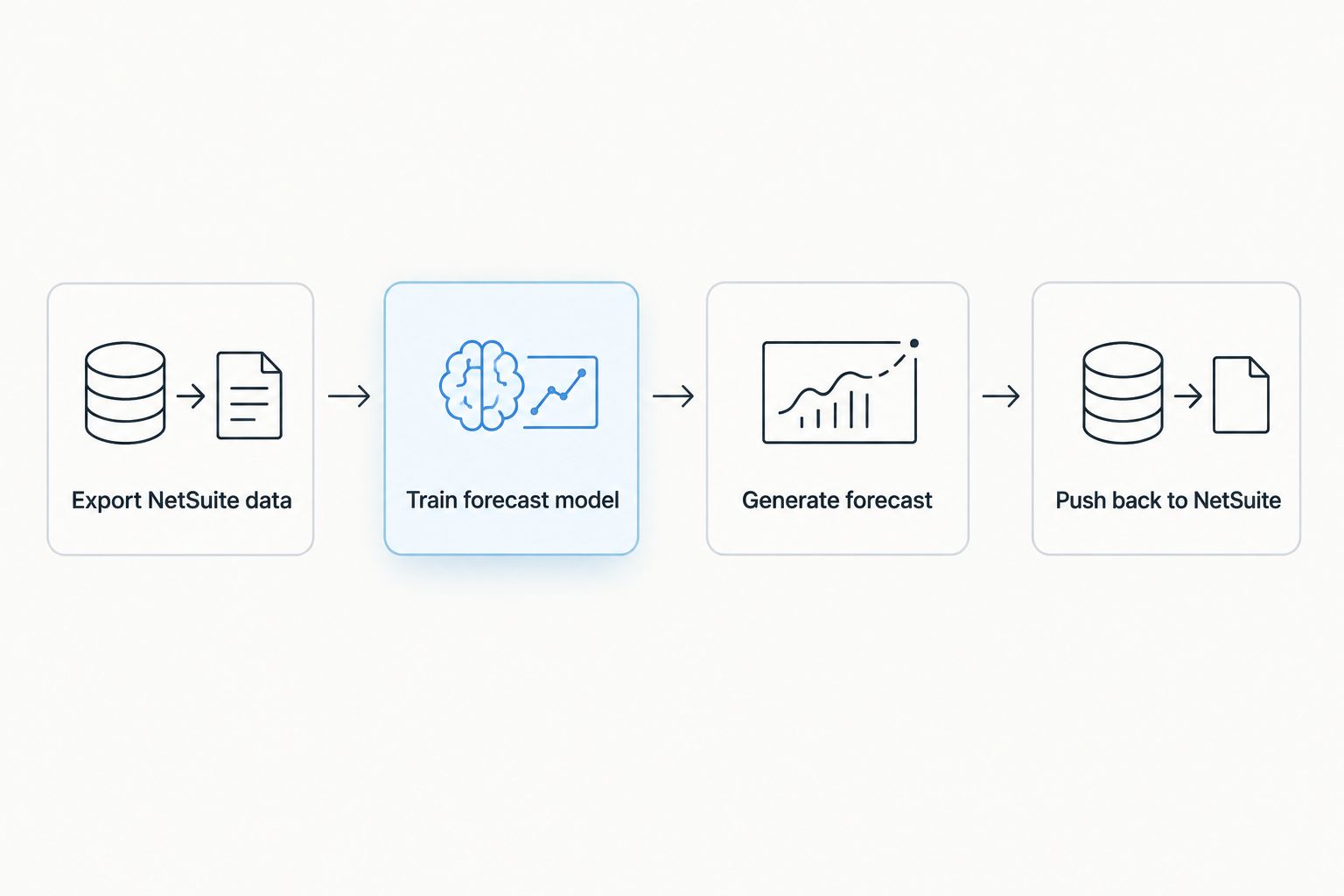
- A netsuite ai demand forecasting workflow pulls sales, inventory, and lead-time data out of NetSuite on a schedule and feeds it to a forecasting model.
- The model writes predictions back into NetSuite's Item Demand Plan so planners see AI output next to native numbers, not in a separate tool.
- Subsidiary-level unit-of-measure mismatches are the most common setup failure — check UOM before the first export.
- A trigger-based reforecast variant updates predictions the moment a large order or promo hits NetSuite, not on the next weekly batch.
- Avanti AI Partners scopes and builds this integration for teams that don't have an in-house data engineer to own it.
Why this matters
NetSuite's native demand planning module is built for reorder points and safety stock math, not pattern recognition across seasonality, promotions, and lead-time volatility at once. Manufacturing and distribution companies running NetSuite in 2026 are increasingly wiring a forecasting model on top of it rather than replacing it — the ERP stays the system of record, the model becomes the brain that reads the data faster than a planner can.
The gap shows up as two failure modes: over-ordering slow movers because the forecast is a trailing average, or stocking out on fast movers because nobody caught the demand spike until the sales order backlog was already three weeks deep. An AI layer that reads NetSuite's transaction history daily catches both earlier than a quarterly spreadsheet review does.
NetSuite's native demand planning handles baseline reorder math; an AI forecasting layer wired directly to NetSuite transaction data catches demand shifts a static spreadsheet model misses by weeks. That's the workflow this guide sets up.
Before you start
- NetSuite admin access with permissions to Saved Searches, SuiteAnalytics Connect (or RESTlets if you're building a custom API pull), and Item Demand Plan records.
- An AI forecasting platform or model endpoint that accepts historical sales, inventory position, and lead-time data as inputs — Avanti AI Partners typically scopes this vendor selection and the integration layer as one engagement so the pieces are compatible from day one.
- The gotcha that bites at step four: NetSuite often stores lead time and safety stock at the subsidiary level with different unit-of-measure conversions across entities. Pull data at the subsidiary level and reconcile UOM before the first export, or the forecast will recalculate against the wrong unit and every downstream number will be off.
Set up your NetSuite data export
- In NetSuite, go to Lists > Search > Saved Searches > New and build a search on the Sales Order and Item Demand Plan record types.
- Add result columns for SKU, location/subsidiary, quantity, transaction date, and lead time. Filter to a trailing window — 24 months is standard for models that need to see seasonality.
- Under the search's Available for SuiteAnalytics checkbox, enable it so the data is queryable by an external connection, or set up a scheduled RESTlet if you need push-based delivery instead.
- Schedule the export to run daily under Available for Reminders or via a scheduled script deployment.
Expected result: a refreshing daily feed of SKU-level sales and inventory history, exportable as CSV or queryable through SuiteAnalytics Connect, with consistent units across subsidiaries.
Configure the AI forecasting layer
- Point the forecasting model's data connector at the NetSuite export — either the SuiteAnalytics Connect endpoint or the scheduled file drop from the step above.
- Map fields explicitly: SKU, location, historical units sold, lead time, and any promotional flag NetSuite tracks. Don't let the model guess field meaning from column names.
- Set the training window to match your export window (24 months is a reasonable default for 2026 seasonal patterns) and set the forecast horizon — most planning teams run 8 to 13 weeks out.
- Run an initial backtest against the last two known quarters before trusting live output. If the model's predicted units are off by a wide margin against actuals you already have, the field mapping or training window needs adjustment before it touches live planning.
Expected result: a SKU-level forecast with confidence bands, refreshed on the same cadence as the NetSuite export.
Push forecasts back into NetSuite
- Use a SuiteScript RESTlet or scheduled script to write the model's forecast values into the Item Demand Plan record, keyed by SKU and location.
- Keep the native NetSuite forecast field visible alongside the AI-generated field rather than overwriting it — planners need to see both during the transition period.
- Set the write-back cadence to match your reorder cycle. Weekly is standard; daily makes sense for fast-moving SKUs with short lead times.
Expected result: planners open the standard NetSuite demand planning screen and see AI-generated numbers next to native ones, with no new tool to log into.
Reforecast automatically when demand signals shift
The batch version above works on a schedule. A second version reacts in real time: whenever a large sales order, a bulk return, or a promotion flag posts in NetSuite, a script triggers an immediate re-run against the forecasting model instead of waiting for the next scheduled pull.
This matters most for SKUs with short lead times, where a weekly batch means the forecast is already a week stale by the time a planner acts on it. Set the trigger on the Sales Order saved search with a Scheduled Script deployment that fires on record save rather than on a time interval, and cap it to SKUs above a volume threshold so you're not re-running the model on every small order.
“If the model only retrains after a stockout, the forecast was already stale before the order landed.”
Comparing your forecasting options
| Approach | Best for | How it updates | Verdict |
|---|---|---|---|
| NetSuite native demand planning | Companies with stable, low-SKU-count demand and simple reorder points | Manual or scheduled recalculation inside NetSuite | Hold — fine as a baseline, weak on volatility |
| Spreadsheet/manual forecasting | Very small catalogs, early-stage operations | Whenever someone updates it | Skip past 2026 volumes — too slow to catch shifts |
| AI forecasting layer wired to NetSuite | Multi-location, multi-SKU operations with seasonal or promo-driven demand | Daily or event-triggered, automatically | Buy — the workflow this guide builds |
Each approach has a real tradeoff. NetSuite's native module requires no new integration and no new vendor relationship, but it reacts to demand changes only as fast as someone remembers to look. A spreadsheet is fully customizable but breaks down past a few hundred SKUs and depends entirely on whoever maintains it staying employed. The AI layer costs setup time and an ongoing model relationship, but it reads every transaction NetSuite logs without anyone opening a report.
Troubleshooting
- Forecast numbers look wildly off after go-live. Check unit-of-measure consistency across subsidiaries first — this is the single most common cause and the gotcha flagged at the start of this guide.
- Model overfits to a one-time promo spike. Flag promotional periods explicitly in the training data rather than letting the model treat them as normal demand; without a promo flag, every future forecast assumes the spike repeats.
- API connection drops silently. NetSuite tokens and RESTlet credentials expire on a schedule set by your account's token policy — set a calendar reminder to rotate credentials before the connection fails mid-cycle, not after.
- Write-back overwrites the native NetSuite forecast field. Confirm the script writes to a custom forecast field, not the standard one, so planners can compare both during the transition period instead of losing the baseline.
- Forecast accuracy degrades after a few months. Retrain on a rolling window rather than a fixed one — a model trained once on 2025 data and never refreshed will miss 2026 seasonal shifts.
Customize your workflow
Once the base NetSuite-to-forecast loop is running, most manufacturing and distribution teams extend it two ways: pushing forecast confidence bands into purchase order approval thresholds, and layering in supplier lead-time volatility so the model adjusts order timing, not just quantity. Teams running similar ERP-to-AI workflows on the finance side often pair this with AI-powered cash flow forecasting built on top of QuickBooks — same integration logic, different data source.
If your NetSuite instance sits inside a manufacturing or logistics operation, the forecasting workflow above is one piece of a broader AI rollout — see how AI consulting firms serving manufacturing companies or logistics and supply chain operations typically scope this kind of engagement in 2026.
Get your NetSuite forecast scoped
Avanti AI Partners maps the integration and picks the model before you touch a single script.
Cost is usually the first question a finance lead asks before approving the build. The honest answer depends on data cleanliness and SKU count — see what AI consulting typically costs in 2026 for a breakdown of what drives the number up or down.
FAQ
What is a netsuite ai demand forecasting workflow?
It's a data pipeline that exports NetSuite sales, inventory, and lead-time history to an AI forecasting model on a schedule, then writes the model's predictions back into NetSuite's Item Demand Plan records. Planners see AI-generated forecasts next to native ones without leaving NetSuite.
Does AI forecasting replace NetSuite's native demand planning module?
No, it sits on top of it. NetSuite stays the system of record for transactions and inventory; the AI layer reads that data and writes forecast values back into the same demand planning screen planners already use.
How often should the forecast refresh?
Weekly batch refreshes work for most SKUs, but fast-moving items with short lead times benefit from event-triggered reforecasting whenever a large order or promotion posts in NetSuite in 2026.
What NetSuite permissions are required to build this?
Admin-level access to Saved Searches, SuiteAnalytics Connect, and Item Demand Plan records is the minimum. Custom write-back also requires script deployment permissions.
What's the biggest setup mistake with NetSuite AI forecasting?
Ignoring subsidiary-level unit-of-measure differences before the first data export. Mismatched units are the most common reason forecast numbers look wrong immediately after go-live.
Can this workflow handle multi-location inventory?
Yes, as long as the NetSuite export includes location as a field and the forecasting model is configured to produce location-level rather than company-level predictions.
Is this workflow only for large enterprises?
No. Mid-sized manufacturers and distributors running NetSuite with a few hundred SKUs across two or three locations are the most common fit in 2026, since spreadsheet forecasting stops scaling around that size.
Who builds this integration if we don't have a data engineer?
An AI consulting firm familiar with both NetSuite's SuiteScript environment and forecasting model integration typically scopes and builds it as a single engagement rather than two separate vendor relationships.
One last thing
The planners who trust this workflow fastest aren't the ones who get the most accurate forecast in month one — they're the ones who can see the native NetSuite number and the AI number side by side and watch the AI number win over a few reorder cycles. Don't hide the comparison. Showing both fields in NetSuite for the first quarter after go-live is what gets a skeptical planning team to actually use the new number instead of quietly overriding it.